
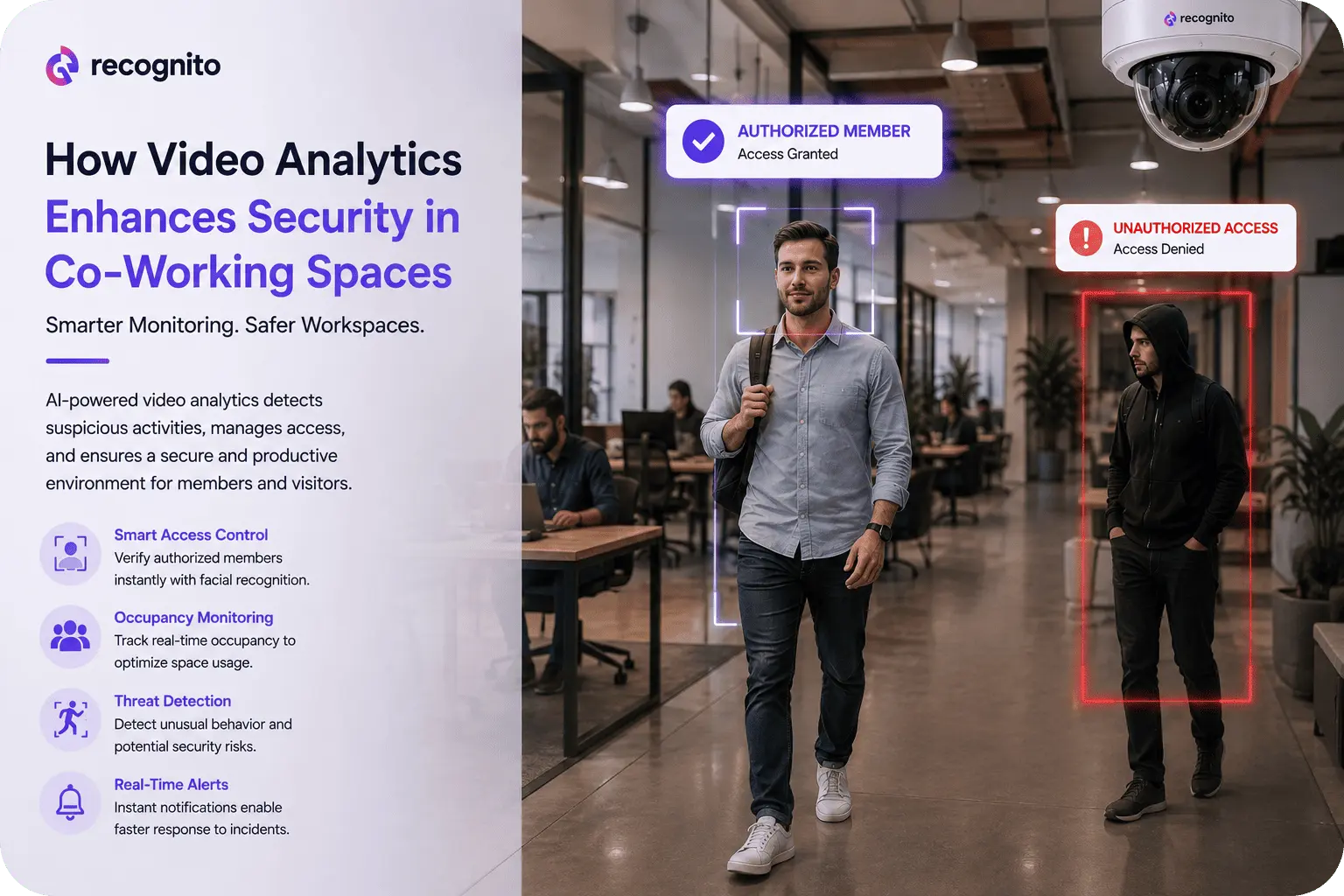
Co-working spaces present a security challenge that traditional surveillance was not designed to handle. A single facility can contain many companies, members, guests, contractors, shared rooms, private offices, and restricted areas, while occupancy and access permissions change throughout the day.
Conventional CCTV records what happened, but staff still have to notice important events, understand them, and decide what to do.
Video analytics changes that relationship. Instead of treating cameras as passive recorders, analytics software can interpret video streams and identify predefined events. In a co-working environment, that can mean detecting after-hours movement, monitoring restricted zones, identifying abandoned objects, or flagging activity that breaks an expected pattern.
The value is turning large volumes of video into actionable security signals while keeping human judgment in the loop.
Why Co-Working Spaces Need More Than Conventional CCTV
A private corporate office often has known schedules, fixed work areas, and centrally managed credentials.
Co-working sites are less predictable. A person may access one floor but not another, a guest may be authorized for one room, and cleaners or delivery workers may have temporary access.
That creates more opportunities for tailgating, unauthorized entry, theft, accidental access to restricted areas, and disputes after incidents.
Video remains useful for investigations, but manually reviewing hours of footage is slow. NIST’s security controls recognize video surveillance as a way to monitor physical access and call for defined surveillance areas, review frequency, and retention periods. See NIST SP 800-53’s physical-access monitoring guidance.
Analytics adds a way to prioritize the frames that matter.
What Video Analytics Adds to a Security System
Video analytics applies computer vision and rules to camera feeds. Depending on the platform, it can detect people, movement, occupancy, zones, objects, and defined behaviors.
A basic system may alert when someone enters a restricted zone; a more advanced deployment can correlate time, location, direction, and other events.
The workflow shifts from record → store → investigate to observe → analyze → alert → verify → respond. Analytics does not need to make the final security decision; it can surface events that deserve attention.
For co-working operators, that can reduce monitoring workload and improve response to time-sensitive events.
For wider context on how surveillance technology has evolved, see the evolution of video surveillance.
Security Use Cases That Matter in Co-Working Environments
Unauthorized access and restricted zones
Virtual boundaries can cover server rooms, private offices, equipment storage, staff-only spaces, and other sensitive areas. If someone enters outside permitted conditions, analytics can trigger an alert.
Access-control logs show which credential opened a door; video adds visual context.
After-hours activity
A site may operate late, but not every area should remain accessible. Analytics can flag movement in designated zones during defined periods, reducing the need for continuous screen watching.
Tailgating and unauthorized following
Access-control systems authenticate the presented credential but may not know whether others followed through. Video analytics can flag unusual entry patterns or provide evidence when door events and camera observations do not align.
Loitering and unusual behavior
A brief wait in reception is normal; prolonged presence near an entrance, storage area, or restricted corridor may deserve attention. Duration and zone rules can identify unusual occupancy without continuous monitoring.
Abandoned or removed objects
Analytics can flag objects that appear or remain in predefined areas so staff can determine whether action is required.
Occupancy and overcrowding
Security also includes safety. High occupancy can create emergency and evacuation risks, and analytics can provide approximate occupancy information for meeting rooms, entrances, or shared areas.
Connecting Video Analytics With Access Control
The strongest systems do not treat cameras as an isolated layer.
If an employee-only door opens at 2:00 a.m., access control identifies the credential while analytics can show whether one person entered, whether someone followed, and where movement continued.
| Security layer | What it knows | What video analytics adds |
| Access control | Credential, door, timestamp | Visual context around the access event |
| CCTV recording | What the camera captured | Automated identification of predefined events |
| Visitor management | Who was expected | Evidence of actual movement and activity |
| Alarm system | Triggered security conditions | Visual verification and context |
| Incident response | Actions taken | Faster prioritization of relevant events |
The combination is more informative than either system alone.
Facial Recognition Can Add an Identity Layer
Some platforms also include facial recognition or matching. This can add an identity signal at controlled entry points, but it should not be deployed everywhere simply because the capability exists.
Facial recognition introduces additional privacy, governance, accuracy, and security considerations. The appropriate deployment depends on purpose, legal environment, notice requirements, data lifecycle, and risk model.
For context, face recognition system fundamentals and practical examples can help teams assess where it belongs in a broader workflow.
For a deeper security perspective, presentation attack detection explains how spoofing defenses complement biometric recognition.
Real-Time Alerts Versus Post-Incident Investigation
Traditional CCTV is strongest after an incident. Analytics can add value while an event is unfolding by sending real-time alerts.
That can matter when someone enters a restricted room, remains in an unusual area, or triggers another defined rule.
Those alerts should prompt verification, not be treated as proof of a threat. Human review remains important because context determines whether an event is actually suspicious.
Video Analytics Can Also Support Workplace Safety
The same infrastructure can support safety monitoring such as crowding, hazardous areas, falls, and blocked routes.
That can reduce the need for separate systems, but purpose still matters. An analytic designed for occupancy is not automatically appropriate for identifying individuals, and a safety system should not quietly become broad employee monitoring.
Privacy Is a Core Design Requirement
More advanced analytics also increases governance requirements. Video can contain identifiable visitors, employees, and customers, while analytics may infer information from movement or behavior.
The UK’s Information Commissioner’s Office notes that AI-based surveillance can process more sensitive categories of personal data. Its video surveillance and CCTV guidance highlights data-protection responsibilities.
Operators should define each analytic’s purpose, camera placement, processed data, access rights, retention, and alert handling.
Privacy should be part of the design from the beginning.
Avoiding False Alerts
Too many irrelevant alerts can turn analytics into a liability. Staff may start ignoring notifications.
Performance should therefore be tested in the real environment. Lighting, reflections, camera angles, crowds, furniture, cleaning activity, and changing occupancy can affect detection.
Tune rules and escalation levels to risk. Night-time movement in a server room may require immediate attention, while lounge occupancy may only need a facility notification.
The goal is not maximum detection; it is useful detection with an acceptable false-alert burden.
Building a Practical Co-Working Security Architecture
A successful implementation starts with a security assessment, not a camera purchase. Map entrances, exits, shared areas, restricted rooms, assets, blind spots, emergency routes, and privacy-sensitive locations. Then determine which events actually matter.
A practical process is:
- Define security objectives. Decide whether the priority is unauthorized access, theft prevention, incident response, occupancy management, safety, or another measurable outcome.
- Choose relevant analytics. Enable only detections that support those objectives.
- Create zones and rules. Configure restricted areas, schedules, duration thresholds, and escalation criteria.
- Connect systems. Integrate analytics with access control, alarms, visitor-management tools, and security workflows where appropriate.
- Test in live conditions. Evaluate false alerts, missed events, latency, lighting changes, and different occupancy levels.
- Establish response procedures. Every important alert should have a defined human action.
- Review performance. Measure detection quality, response time, incident outcomes, and operational workload.
Testing should verify whether the complete process works as intended, not merely whether a camera or analytic feature is technically active.
From Detection to Incident Response
The alert itself has little value unless it leads to a clear response.
Co-working operators should define what happens after each category of detection. A restricted-room alert may require immediate security review. A crowding alert may go to facilities. A repeated tailgating pattern may require an access-policy change instead of a single response.
Incident records should preserve enough context to reconstruct what happened, including the camera, time, zone, rule, and relevant access event.
This connects analytics directly to operational security instead of leaving alerts in a dashboard that nobody acts on.
Security Analytics Should Be a Layered System
Video should not become the single source of truth. A person in a restricted area could be an intruder, employee, contractor, or someone incorrectly granted access.
Analytics works best when correlated with access permissions, schedules, alarms, visitor records, and human verification.
Operators can start with a few high-risk zones, measure outcomes, and expand where evidence supports the investment.
For teams evaluating biometric components within a wider video-security architecture, a facial recognition SDK can be considered where identity-based verification genuinely contributes to the use case.
Technical teams can also use the Recognito GitHub repository for developer-oriented resources.
What Security Teams Should Measure
A successful deployment needs measurable outcomes.
Useful metrics include:
- Alert precision: How many alerts represent events worth reviewing?
- Missed-event rate: How often does the system fail to detect defined scenarios?
- Response time: How quickly can personnel validate and act on alerts?
- Manual workload: How much monitoring or investigation time is saved?
- Incident frequency: Are unauthorized events or losses declining?
- System availability: Are cameras, analytics, and integrations reliably operational?
- Privacy compliance: Are retention, access, notices, and data-handling controls operating as designed?
These metrics provide a better basis for optimization than simply counting alerts.
The Future of Co-Working Security
The most useful direction in video security is better coordination between physical security systems.
Video analytics can connect camera events with access, visitor information, alarms, and facility operations, moving teams toward risk-based attention.
NIST’s strategic roadmap for interoperable public-safety video analytics highlights interoperability as an important direction for video analytics.
The challenge is gaining useful intelligence without making every movement a data point subject to indefinite monitoring.
Conclusion
Video analytics enhances co-working security by turning passive camera infrastructure into a system capable of identifying defined events, prioritizing attention, and providing real-time context around access and incidents.
Its greatest value comes from integration. When analytics works alongside access control, visitor management, alarms, and trained security personnel, the organization gains a more complete picture of what is happening across a dynamic shared workspace.
But effective deployment requires restraint as well as technology. Clear use cases, carefully tuned detection rules, realistic testing, human verification, privacy controls, and defined retention policies are essential to avoid turning useful security intelligence into excessive monitoring.
For co-working operators exploring biometric and computer-vision capabilities as part of that broader architecture, Recognito provides technologies that can support identity-focused security workflows.
Frequently Asked Questions
Can video analytics replace security guards in a co-working space?
No. Analytics can automate detection and prioritization, but people are still needed to verify alerts, interpret context, respond to incidents, and handle unusual situations.
Can video analytics detect unauthorized people?
It can identify defined patterns such as movement in restricted zones and provide visual evidence around access events. Identity-based detection requires additional technologies and should be deployed only where appropriate.
Does video analytics require facial recognition?
No. Many useful security applications rely on motion, zones, occupancy, object detection, or event rules without identifying individuals.
How can co-working spaces reduce false alerts?
Use carefully defined zones, schedules, thresholds, and event rules, then test them under real lighting, occupancy, and operational conditions. Alerts should also be prioritized according to actual risk.
Is video analytics a privacy concern?
Yes. Analytics can increase the amount and sensitivity of information derived from video. Organizations should establish a clear purpose, minimize unnecessary processing, control access, define retention, and meet applicable privacy requirements.